AI photo studio

Your photos,
reimagined.

Sixteen AI tools in one beautiful app. Age yourself forward, swap any background, turn a selfie into a cartoon β€” Glintly reshapes photos in seconds with studio-grade quality.

0 AI tools
0 App Store rating
0 Photos transformed
Glintly app interface
πŸŽ‚ Age progression
πŸ™οΈ Background swap
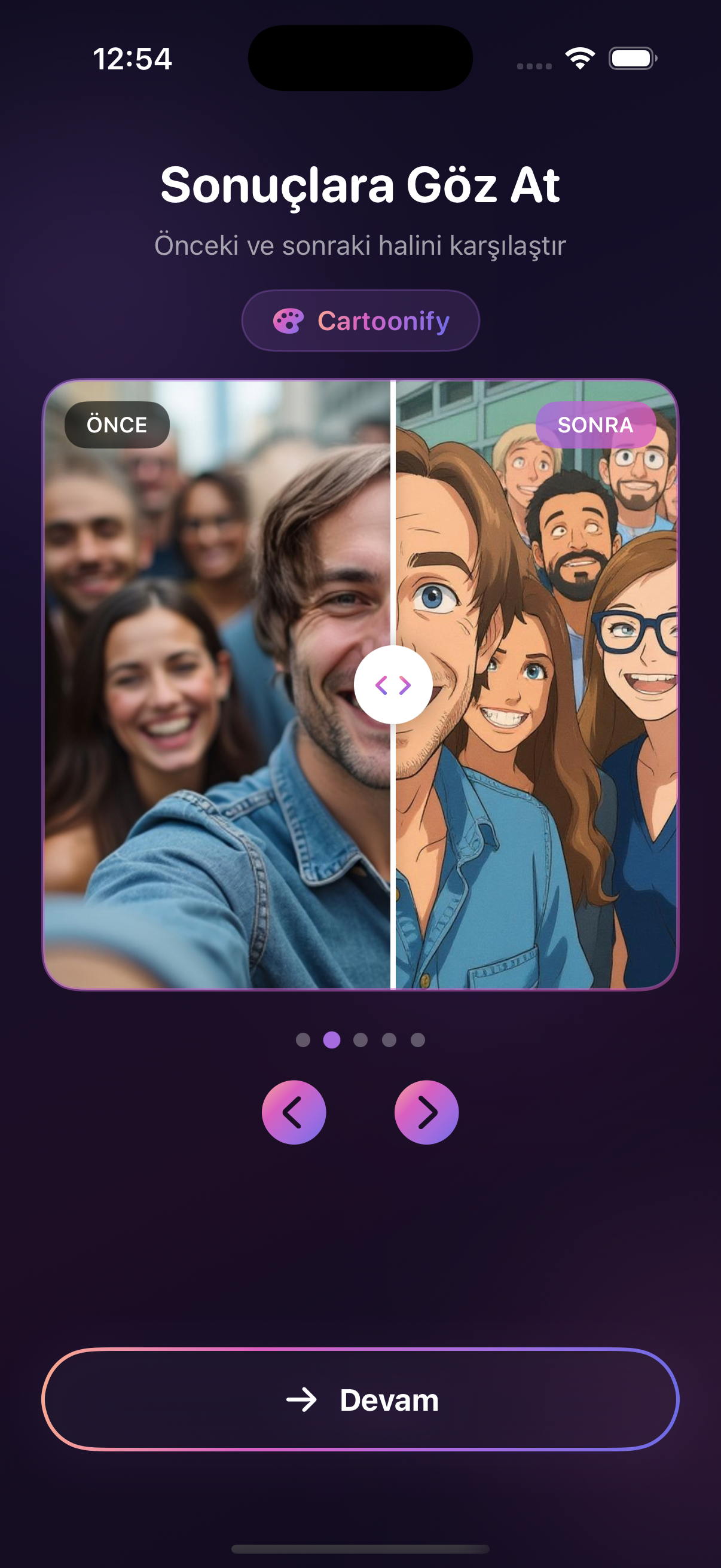
✨ Cartoonify

One app. Everything you need.

Featured on App Store 16 AI tools Seconds to result Non-destructive

How it works

Three taps. Endless possibilities.

The same workflow for every tool. No learning curve.

01

Upload

Drop in any photo from your library β€” portraits, selfies, group shots, or old scans.

02

Pick a tool

Choose from sixteen AI tools: age progression, background swap, cartoon style, restoration and more.

03

Share

Export at full resolution and post to Instagram, TikTok, or save to your camera roll.

Flagship features

Transformations that actually wow.

A handful of our most-loved tools β€” each one built to deliver something other apps can't.

See yourself at every age

From teenage snapshots to senior portraits, Glintly's age progression morphs decades forward or backward β€” preserving the features that make you, you. Show parents their younger selves. Show kids who they'll become.

Any background, any scene

Beach sunset. Tokyo street. Outer space. Perfect lighting and shadows included.

Cartoon, plushie, pixel

Turn any portrait into a stylized look β€” without losing what makes you recognizable.

Every hairstyle

Buzzcut to waist-length, in one tap.

Restore old photos

Revive faded memories with color and clarity.

Erase anything

Unwanted people, objects, or text β€” gone.

The complete toolkit

Sixteen tools, one beautiful app.

Every transformation you could want, curated and tuned so you don't have to juggle apps.

Age progression

See yourself at any age, younger or older.

Baby version

Turn anyone into their baby self.

Background change

Swap any background, any scene.

Cartoonify

Vibrant cartoon portraits, bold outlines.

Color correction

Professional grading, balanced tones.

Expression change

Any emotion, one tap away.

Face enhancement

Studio-grade retouch, natural texture.

Hair change

Every style, any length, zero commitment.

Object removal

Erase anything β€” people, objects, clutter.

Photo restoration

Bring faded memories back to life.

Plushie style

Turn yourself into a cuddly plushie.

Pro portrait

Studio-grade headshots from any selfie.

Realism boost

Sharpen detail, enhance features, kill blur.

Scene composition

Place yourself in any world, any setting.

Text removal

Wipe out text from signs, walls, photos.

Time of day

Golden hour to midnight, any mood.

Why Glintly

A photo editor, without compromises.

Most photo apps do one thing well. Glintly brings sixteen professional-grade AI tools into one beautiful interface β€” so whether you need a quick retouch or a full creative transformation, you never have to switch apps again.

  • βœ“Sixteen curated AI tools in one app
  • βœ“Studio-grade results, seconds per tool
  • βœ“Non-destructive β€” original always preserved
  • βœ“Designed for iOS, tuned for speed
Glintly editing preview

Reviews

Loved by creators everywhere.

Thousands of 5-star reviews from people who finally found their one-stop photo app.

β€œThe age progression blew my mind. My parents cried seeing themselves as kids again. And cartoon mode? My feed has never been this fun.”

MT
Mia Taylor
@miataylor

β€œI was skeptical about cramming sixteen tools into one app, but the quality on every single one is absurd. Background change alone is worth it.”

JR
Jordan Reyes
@jordanr

β€œFrom retouching selfies to restoring my grandparents' old photos, Glintly replaced half the apps on my phone. I can't go back.”

AK
Alex Kim
@alex.k

FAQ

Questions, answered.

What can Glintly do?
Sixteen AI-powered transformations β€” including age progression, background change, cartoon and plushie styles, hair change, photo restoration, expression change, object removal, professional portraits and more. One app, every tool.
How natural do the results look?
Every model is tuned to preserve identity and natural detail. Stylized tools like cartoon and plushie are bold but still recognizable; face edits keep pores and texture intact so nothing looks fake.
How long does each transformation take?
Most tools finish in 5–10 seconds. More complex transformations like scene composition or age progression may take up to 30 seconds depending on image size.
Is Glintly free?
Free to download with core tools included. Premium unlocks unlimited use of every tool and higher-resolution exports.
Can I undo an edit?
Always. Every edit is non-destructive β€” your original photo is preserved and you can revert at any time.
What devices does it run on?
Glintly runs on iPhone (iOS 16+) and iPad. An Android version is on the roadmap.

Sixteen AI tools. One beautiful app.

Download Glintly free and start transforming your photos in seconds.

Download on the App Store